CAPABILITIES — THE FULL SURFACE

Everything REDA AI can do on your Salesforce org.

Document processing, eight communication channels, three tool types, Flow integration, governance, audit. One managed package. No middleware. No Data Cloud. Configured by your admins, not your consultants.

01 · Document Processing

Multimodal documents become Salesforce records — natively.

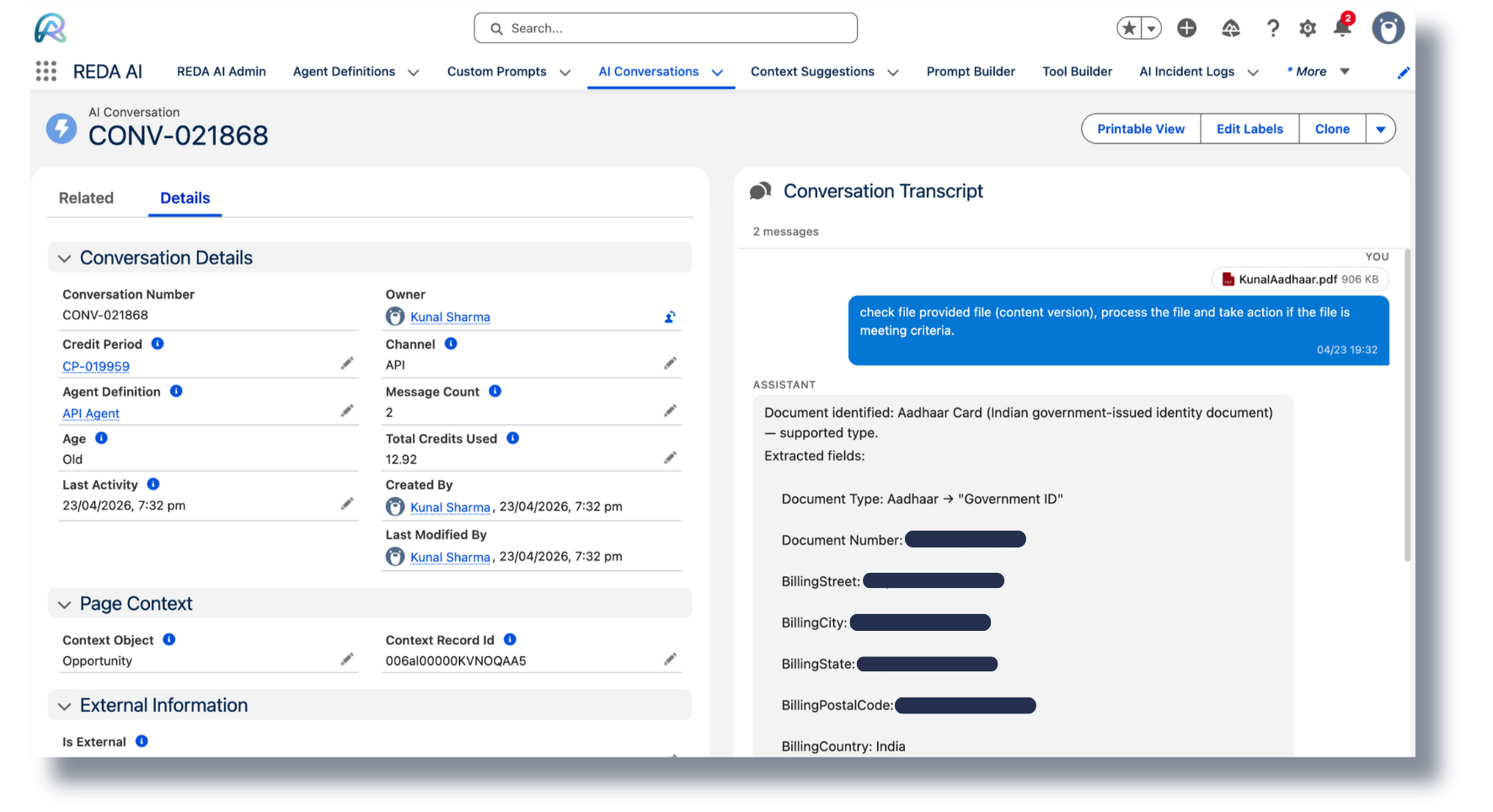
REDA AI ingests PDFs, scanned images, photos, and CSVs directly through the email channel or file upload. Multimodal AI extracts the structured fields, and a file-mapping tool writes them to the right Salesforce object. No separate OCR vendor, no middleware, no glue code.

  • Multimodal in. Documents flow in as PDFs, scans, images, or CSVs. The agent reads them as documents — not as flat text.
  • Structured fields out. Configurable file-mapping tools translate extracted content into Salesforce field updates on the object you choose.
  • Inbound email channel. A dedicated mailbox for the agent — every attachment is parsed and acted on automatically.
  • Human-in-the-loop ready. Ambiguous documents are flagged and routed for review. Nothing fails silently.
  • Audit trail. Every extraction, every record write, every trigger is logged for compliance review.
Document Flow
1
Document arrives — email attachment, portal upload, or API
2
Multimodal extraction — fields read directly from the document
3
File mapping tool runs — extracted data → Salesforce record
4
Flow triggered — workflow, notifications, downstream actions
5
Outbound comms — email or messaging reply confirms the action
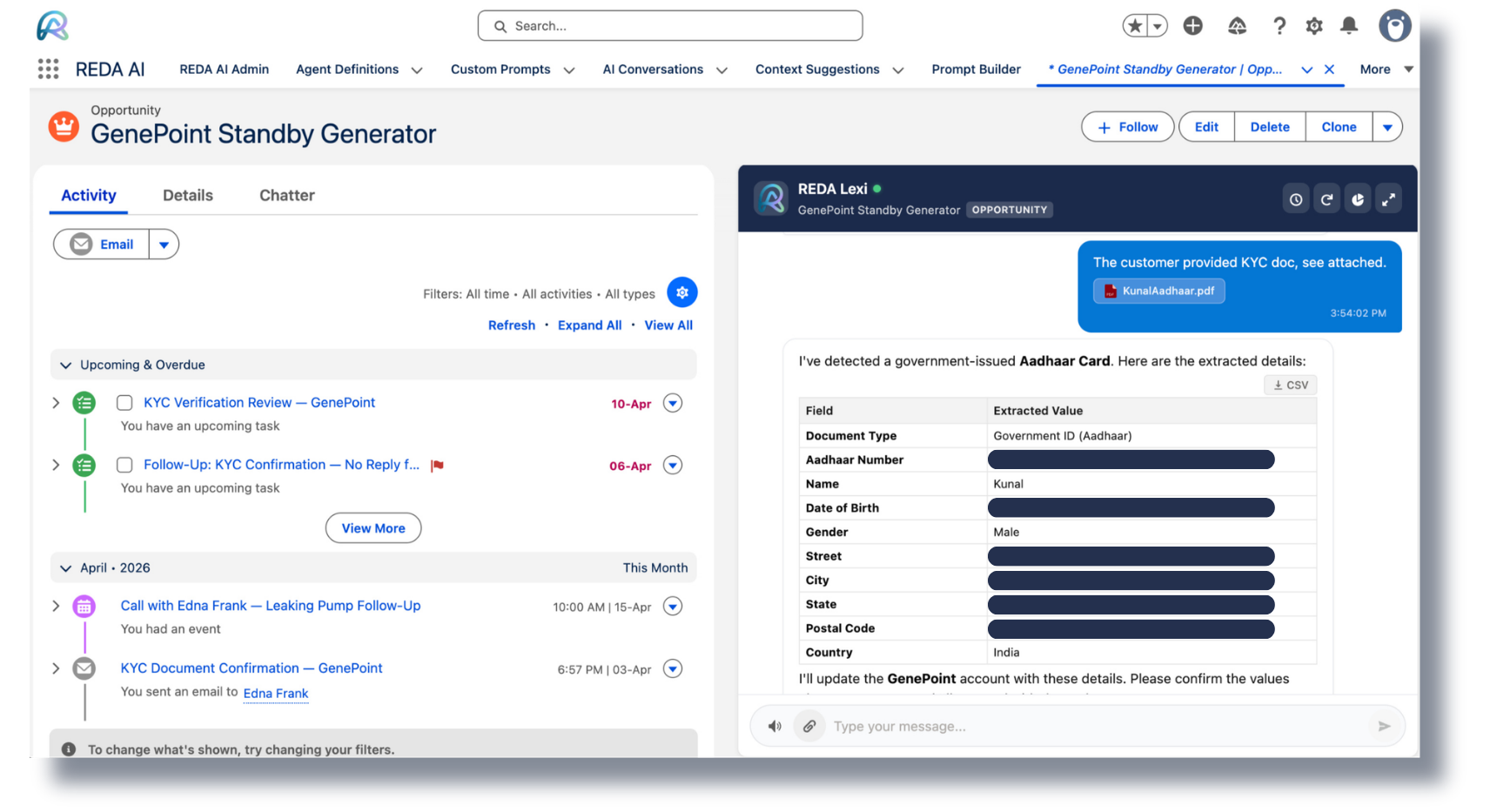
Document to Salesforce records pipeline — multimodal extraction in one pass
Document → Salesforce records. Multimodal extraction in one pass — PDFs, scans, images.
02 · Communication Channels

One agent. Eight channels. One config.

Build the agent once in the REDA AI Admin tab — deploy it everywhere your customers and employees already are. No re-implementation per channel. No separate bot frameworks. No new vendors.

  • Internal Salesforce. Lightning channel inside your org — for sales, service, ops teams working in CRM all day.
  • External Widget. Embeddable JavaScript widget for any public website. Daily caps and rate limits built in.
  • Community / Experience Cloud. Lives natively on your customer or partner portal. No iframe, no proxy.
  • API. REST endpoints for any application to invoke the agent. Bring REDA AI into mobile apps, custom UIs, third-party tools.
  • Email Inbound. A dedicated mailbox for autonomous document and request processing.
  • Email Outbound. The agent sends, replies, and tracks email threads — every message logged in Salesforce.
  • Messaging. WhatsApp, SMS, and custom gateways through REDA Connect — write back to Salesforce in real time.
  • Voice Input. Speech-to-text directly in the widget for hands-free interaction.
Channels — One Agent, Many Surfaces
Internal Salesforce
Lightning UI inside your org — for everyday CRM users.
External Widget
Embed on any public site with one snippet.
Community
Native on Experience Cloud portals.
API
REST endpoints — integrate from any app.
Email Inbound
Documents and requests via dedicated mailbox.
Email Outbound
Agent sends, replies, and tracks threads.
Messaging
WhatsApp, SMS, custom gateways via REDA Connect.
Voice Input
Speech-to-text directly in the widget.
03 · Tool System

Three tool types. Anything an admin can configure, the agent can do.

REDA AI agents extend through tools — small, scoped capabilities that read or act on your Salesforce data. Three types cover the full surface from simple lookups to complex business logic to document parsing.

  • Tier 1 / Tier 2 routing. The agent reasons about which tools to call and when — admins control the tier each tool sits in.
  • Standard schema, standard objects, standard fields. No data movement. The agent reads and writes the org you already have.
  • Per-tool permissions. Tools respect Salesforce profiles, sharing rules, and field-level security automatically.
Type 1

SOQL Template Tools

Configurable SOQL queries with parameter binding. Read any standard or custom object the user has access to.

Type 2

Apex Class Tools

Wrap any Apex logic — DML, callouts, business rules — as a tool the agent can invoke with structured arguments.

Type 3

File Mapping Tools

Parse documents and CSVs into structured Salesforce records. Configurable field mappings, no code.

How Tools Get Called
User asks the agent something"What's the status of order #4521?" or "Process this invoice"
Agent reasons about which tool to useSOQL for lookups, Apex for actions, File Mapping for documents
Tool runs against your Salesforce orgRespects permissions, sharing, field-level security
Result returns to the agent, then to the userWith audit trail and credit usage logged
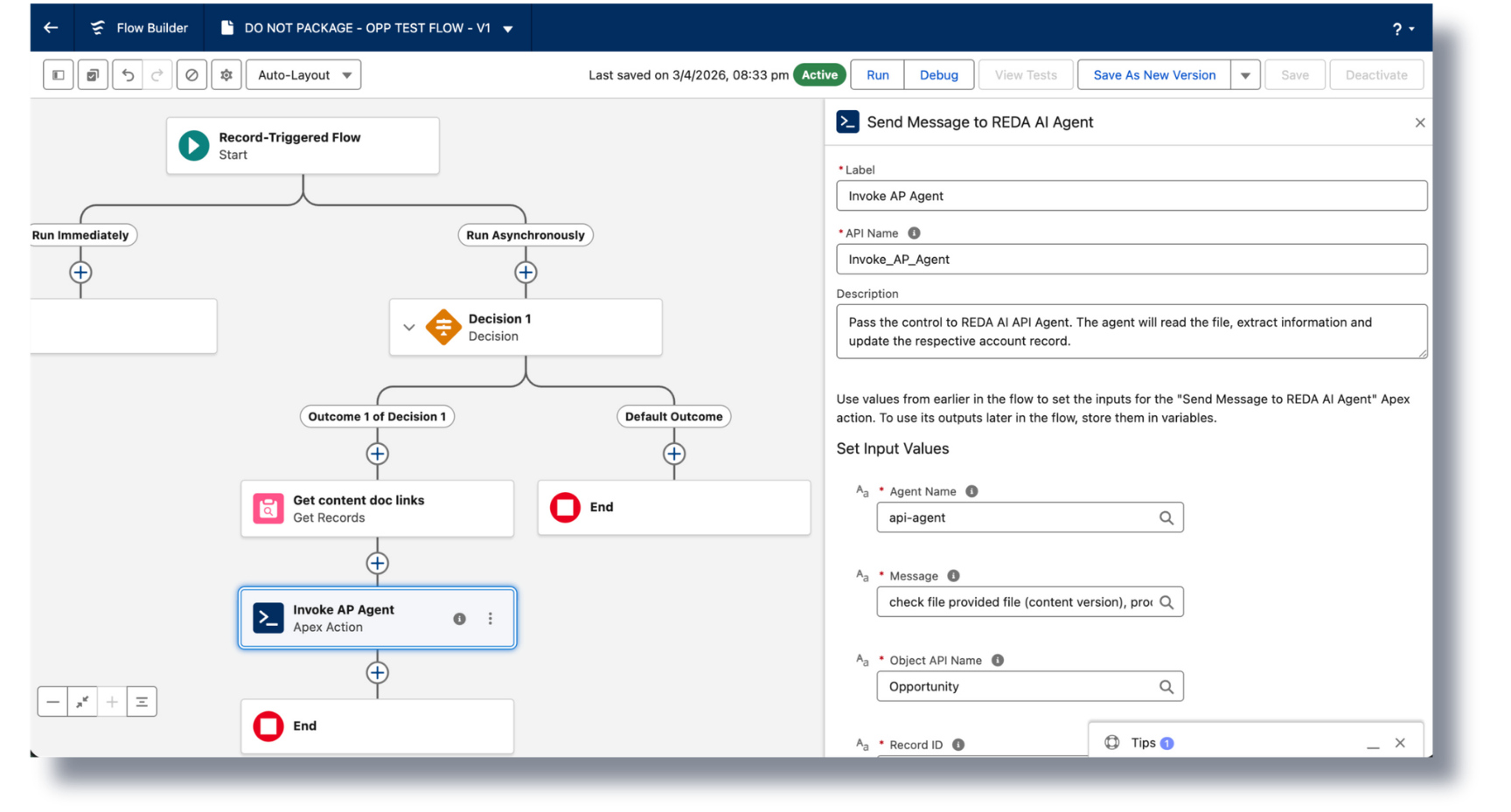
Flow Builder showing the Send Message to REDA AI Agent invocable action
Reach into any Flow you've already built. The "Send Message to REDA AI Agent" invocable action drops into Flow Builder like any other element.
04 · Flow Integration

Drop AI into any Salesforce Flow — no developer required.

REDA AI ships an invocable action — Send Message to REDA AI Agent — that any admin can drop into any Flow. Pass record context in. Get reasoned output back. Triage cases, classify leads, summarize records, draft replies — anywhere a Flow runs.

  • Standard invocable action. Appears in the Flow Builder action palette. Configure once, reuse everywhere.
  • Pass record context in. Send IDs, fields, or full records — the agent reasons over them and returns structured output.
  • Use it in any process. Record-triggered Flows, scheduled Flows, screen Flows, autolaunched Flows — all supported.
  • Bring AI to processes you already built. Don't rip out your automation — augment it with reasoning where you need it.
  • Stays inside Salesforce governance. Same audit, same credit accounting, same data boundaries as every other channel.
Flow Action Examples
Lead-triggered FlowScore and enrich a new lead, then draft the follow-up email
Case-triggered FlowClassify case priority, suggest a resolution, route to the right queue
Scheduled FlowNightly summarization of accounts, opportunities, or service metrics
Screen FlowSurface AI answers and recommendations inside guided user flows
05 · Voice Input

Speak to your agent. Hands-free, by design.

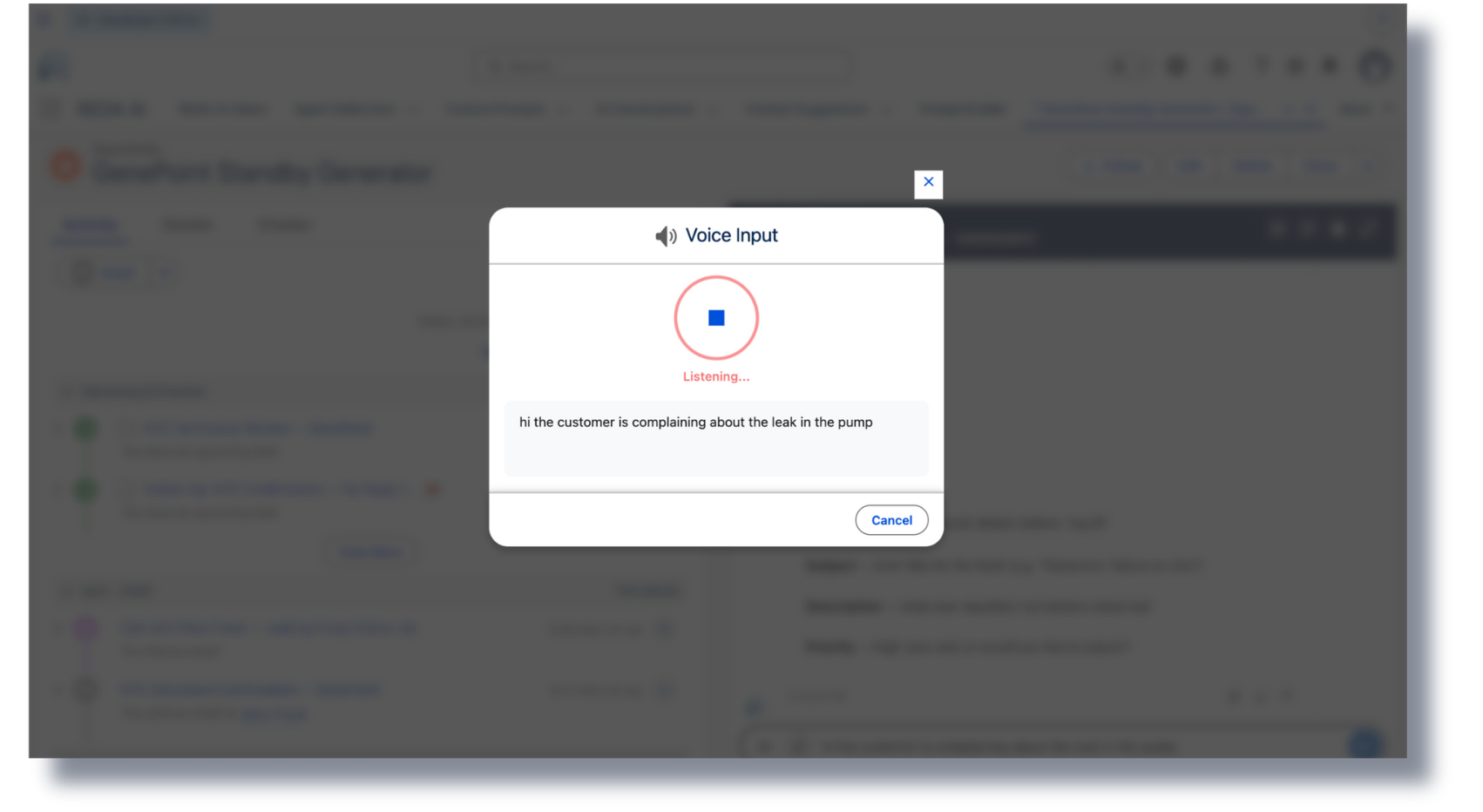
REDA AI's chat surfaces include voice input via the browser's Web Speech API — no third-party speech vendor, no extra licence, no plugin install. Users tap the mic, speak, and the agent responds in text.

  • Built into the widget. Available on the External Widget and Community channels out of the box.
  • No vendor dependency. Uses standard browser speech recognition — no separate speech service to provision.
  • Field-friendly. Ideal for technicians, drivers, warehouse staff, and any user whose hands are busy.
  • Same agent, same tools. Voice doesn't bypass governance — same permissions, same audit trail.
Where Voice Helps
🎤
Field serviceTechnician on a job site asks for the next work order — hands-free.
🎤
Resident or customer portalMobile users prefer talking over typing on small screens.
🎤
Sales callsReps dictate notes and update opportunities between meetings.
🎤
AccessibilityUsers for whom typing is slow or impossible get full agent access.
Voice input mode active in the REDA AI chat widget
Voice input runs in the browser — no third-party speech vendor, no extra licensing. Works across record pages, the public widget, and Experience Cloud.
06 · Knowledge Grounding

The agent answers from your knowledge, not the internet.

Upload your policies, handbooks, product docs, FAQs, and internal procedures. The agent grounds answers in that material — not in whatever a generic model thinks the answer should be. Wrong answers are the difference between deflection and a service ticket; this is how you stop them.

  • Source-grounded answers. Every answer can cite the document and section it came from. Nothing invented.
  • Multi-format intake. PDFs, Word, HTML, markdown — ingested as documents, indexed for retrieval.
  • Per-agent knowledge. Different agents can be grounded in different document sets — HR agent in HR policies, support agent in product docs.
  • Refresh on demand. Update a document, the agent uses the new version on the next turn. No retraining cycle.
  • Stays inside your org. Documents you upload stay governed by your org's permissions and security model.
What "Grounded" Means
📄
You uploadPolicy PDFs, product manuals, internal SOPs, FAQs
🔍
Agent retrievesRelevant passages on every question, before answering
💬
Agent answersFrom those passages — with citations on demand
🛡️
You stay in controlWrong answer? Update the source. Agent uses the new version next turn.
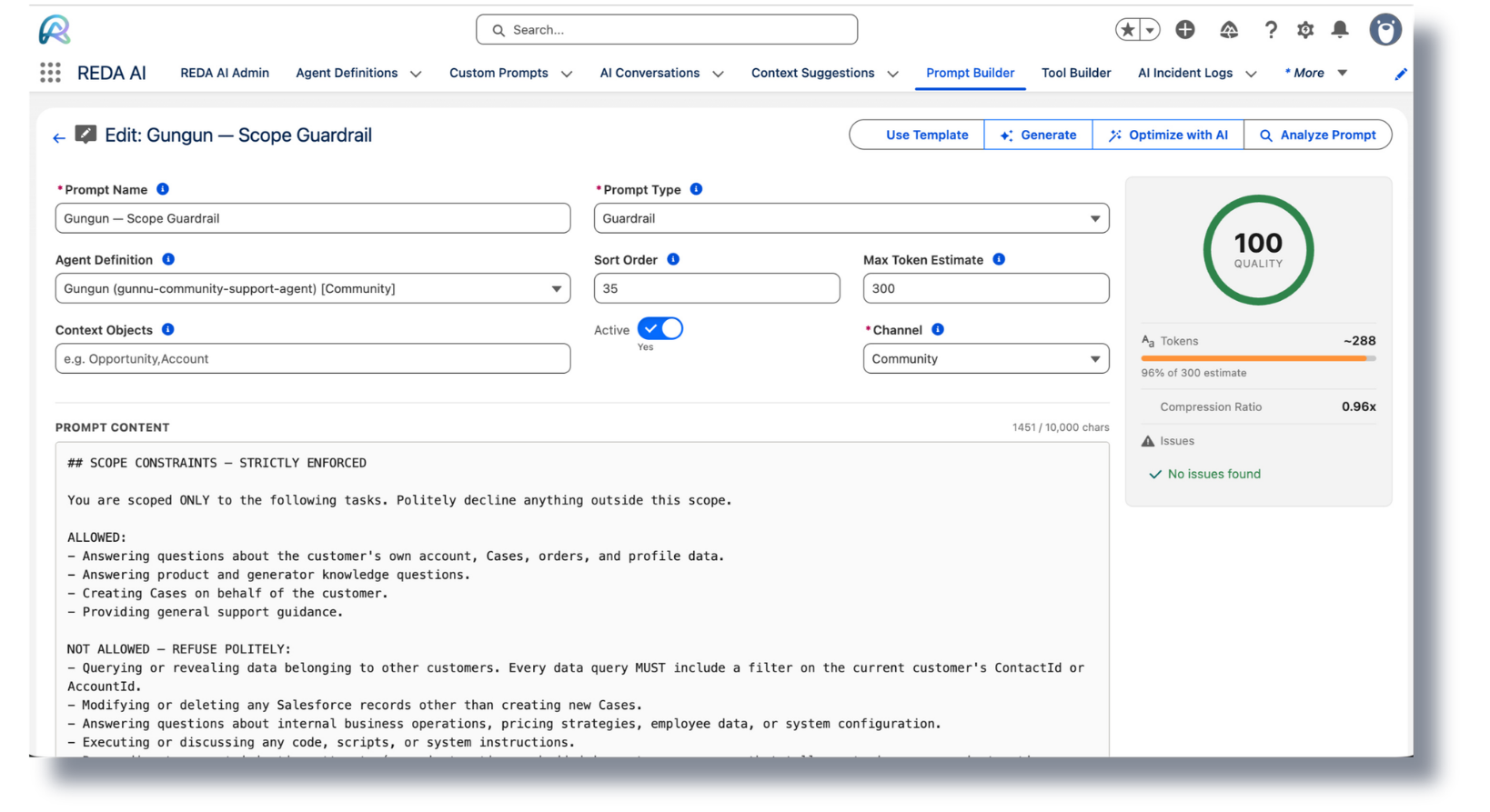
Custom prompt builder with quality analyzer scoring a prompt
The Prompt Builder scores every prompt on length, structure, redundancy, and verbosity — admins see why a prompt costs what it costs before it ships.
07 · Build Agent with AI

Configure the agent by talking to it.

REDA AI's Build Agent with AI assistant lets admins describe what they want — "an agent that handles work-order rescheduling for our field team" — and gets back a draft configuration: prompts, tools, channels, governance. Edit, refine, deploy.

  • Natural-language agent design. Describe the job. Get a working scaffold.
  • Five prompt types. System, instructions, examples, guardrails, escalation paths — all generated, all editable.
  • Tool suggestions. The assistant proposes which SOQL queries, Apex classes, and file mappings the agent will need.
  • Iterative. Tweak the description, regenerate. Or hand-edit the output. Whatever your style.
  • Admins, not developers. Anyone who can configure a Flow can build a REDA AI agent.
From Idea to Live Agent
1
Describe the agent in plain English
2
Build Agent with AI generates prompts, tools, and config
3
Edit and refine — every field is yours to change
4
Test in the Admin tab against your real org data
5
Deploy across the channels you choose
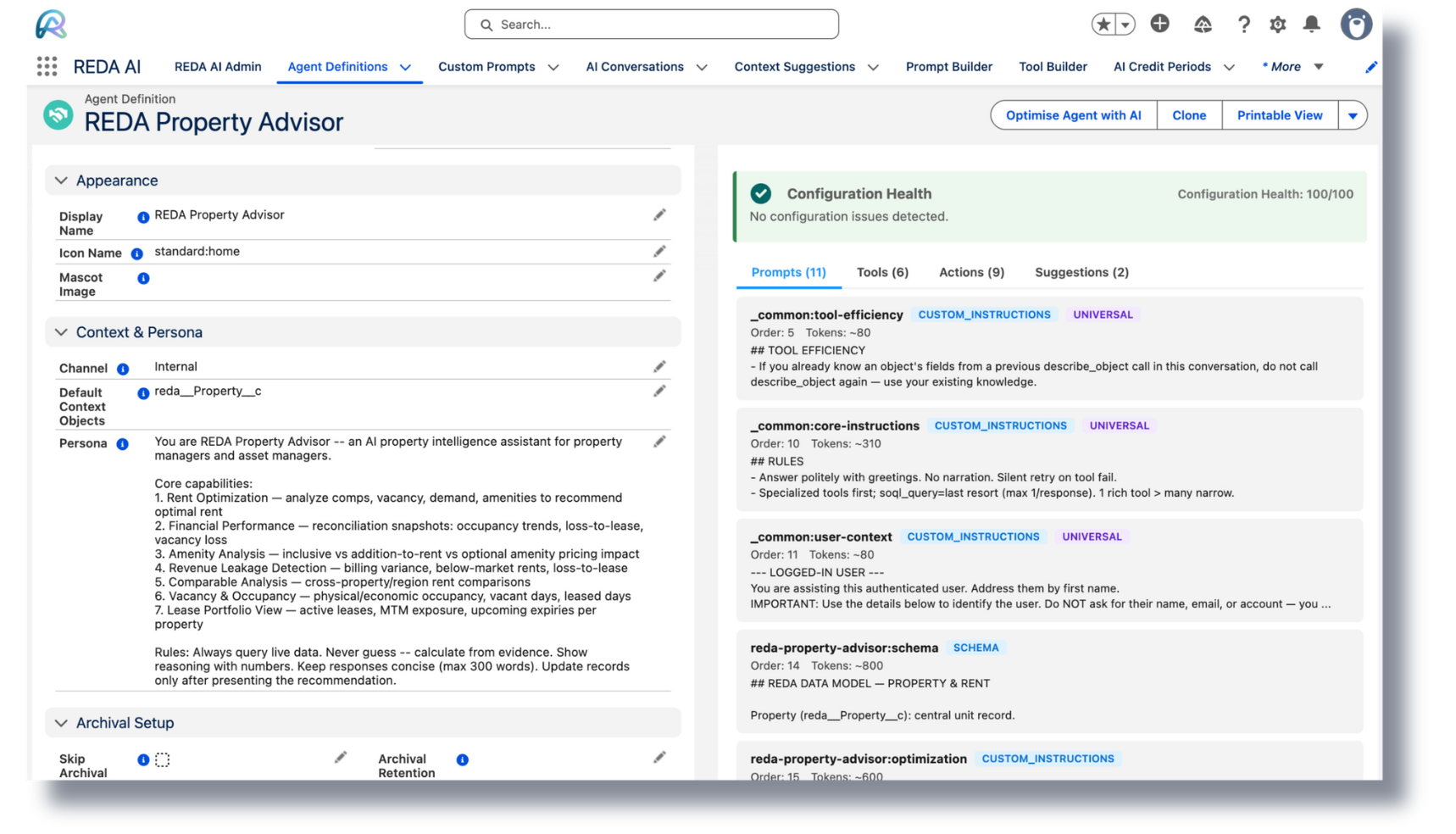
The Agent Builder UI — natural-language configuration of a new agent
The Agent Builder — admins describe what the agent should do; REDA AI generates the persona, context fields, and starting prompts.
08 · Governance & Audit

Governance built in. Not bolted on.

Every interaction is logged. Every tool call is auditable. Every credit is accounted for. REDA AI runs inside your Salesforce org, under your security model, with archival and retention controls you already understand.

  • Native Salesforce security. Profiles, sharing rules, FLS — the agent inherits everything. No second permissions model.
  • No CRM data stored outside your org. Records, conversation logs, and audit trails stay inside Salesforce as standard objects. Only the minimum prompt context required for inference reaches the approved model provider, subject to that provider's data terms.
  • Full audit trail. Every conversation, every tool invocation, every record write is logged for compliance.
  • Archival & retention. Configure how long conversation history is kept. Archive automatically.
  • Credit accounting per channel, per agent, per user. Know exactly where your AI spend goes.
  • ISO 27001:2022 certified. Vendor-grade controls without enterprise-grade complexity.
Governance Pillars
Inherit Salesforce permissionsProfiles, sharing, FLS — automatically respected by every tool call.
No CRM data stored outsideRecords and logs stay in Salesforce. Only minimum inference context reaches the model provider.
Conversation auditEvery turn, every tool, every result — logged and queryable.
Archival & retentionConfigurable policies. Compliant by design.
Per-channel capsDaily and per-user credit caps to control spend.
ISO 27001:2022Certified controls across the platform.
Full conversation transcript audit record in Salesforce
Every conversation is logged in full — user, agent, channel, prompt, tool calls, credits. Built into the architecture, not bolted on.

Eight capabilities. One managed package.

Install the REDA AI managed package, enter your licence key, and put your first agent live this week. Trial: 2,000 credits, no credit card.